AI Integration for Businesses: Use Cases, Challenges, and Implementation Strategies
Sector: AI + Data
Author: Nisarg Mehta
Date: 11/13/2026

Most companies already use AI somewhere. In McKinsey’s 2025 survey, 88% of organizations used AI in at least one business function, yet only 39% reported any impact on EBIT. The difference usually lies in the connection between the model and the systems where work happens.
Experimenting with AI means a team opens a chatbot in a browser tab. AI integration means the intelligence sits inside your CRM, ERP, support desk, product catalog, or custom application, working with live business data inside existing workflows.
That is harder to get right. Legacy systems, disconnected data, security rules, and scale all shape what’s possible. In MuleSoft’s 2025 survey of 1,050 IT leaders, 95% named integration as a hurdle to implementing AI.
This guide covers how AI integration in business works, ten practical use cases, a seven-step approach for integrating AI into existing business systems, the main architectures, costs, ROI, and examples from Techtic’s own projects. If you’re still deciding where AI fits, AI consulting and a strong data foundation are the right starting points.
What Is AI Integration and How Does It Work?
AI integration is the process of connecting AI capabilities, such as machine learning models, large language models (LLMs), and AI agents, to a company’s existing applications, data, and workflows so they work with live business context inside everyday processes. Instead of copying data into a separate AI tool, the AI works where the data and people already are.
How AI Integration Connects Business Applications and Systems
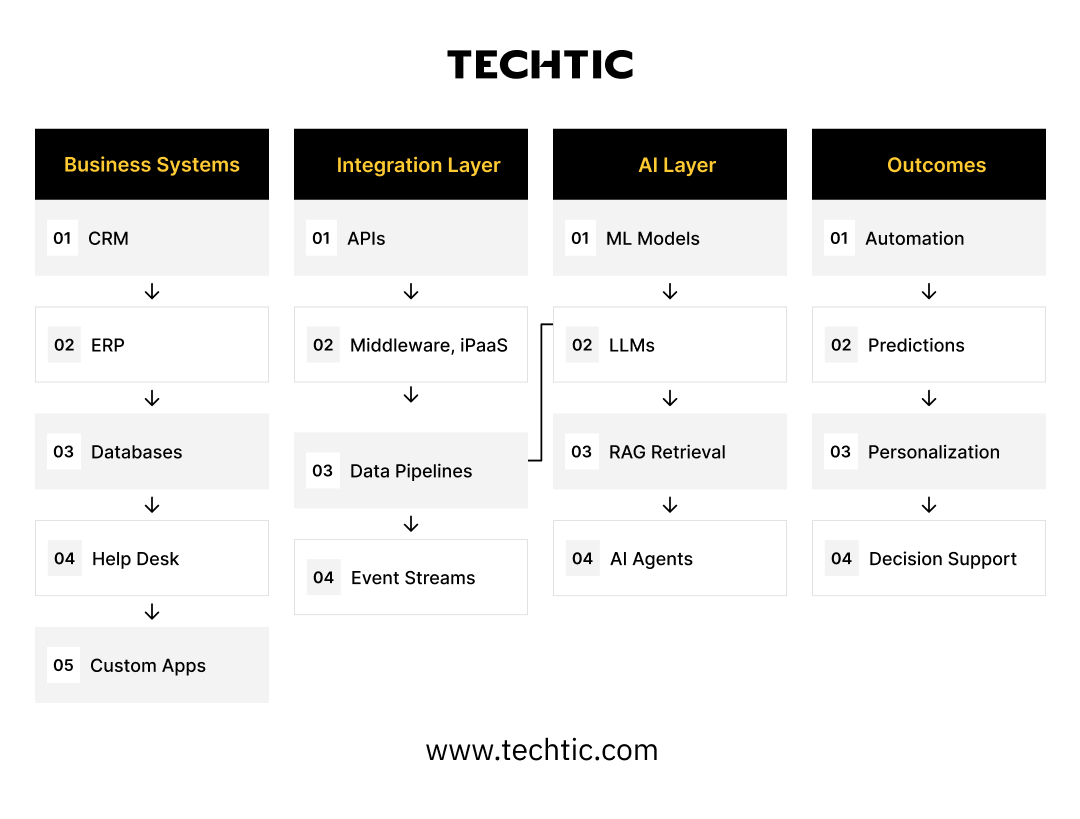
Most integrations follow the same flow: a business system triggers a request, an integration layer moves and secures the data, a model processes it, and the result flows back into the system of record.
- APIs let applications exchange data with each other and with AI models.
- Middleware or integration platforms (iPaaS) orchestrate connections, transform data formats, and handle retries and logging.
- Data pipelines extract, clean, and sync data from databases and warehouses so AI works from current information.
- AI models (predictive machine learning, LLMs, or agents) produce predictions, content, or decisions.
- Business applications display results and record actions.
These pieces can run in the cloud, on-premises, or in a hybrid setup where sensitive data stays on internal servers while models run in the cloud.
AI Integration vs. AI Implementation: Understanding the Difference
AI implementation is the broader program: choosing use cases, preparing people, building or buying models, and changing processes. AI integration is the engineering work inside that program that connects AI to the systems and data it needs. For the narrower, application-level version, see Techtic’s guide to integrating AI into a web app.
Key Components of an AI-Integrated Business Ecosystem
Studying Salesforce’s generative AI rollout, Haki et al. (2025) recommend coordinated work on platform capability, architecture, and governance: an AI stack built on existing services, layers that accommodate multiple foundation models, a trusted environment for secure data access and privacy, and mechanisms to manage risk.
For most businesses, that translates into four components: clean, connected data; an integration layer; the right model for each task, including generative AI where language matters; and guardrails for access, cost, and output quality.
10 Practical AI Integration Use Cases for Businesses
1. Customer Support Automation
Agents spend hours on repeat questions. An AI assistant grounded in help articles and order data resolves routine requests and drafts replies for complex ones. Connects to: help desk, knowledge base, order management. Scenario: a customer asks about a late order, and the assistant checks shipping status before replying.
2. Sales Intelligence and Lead Scoring
Reps lose time on low-intent leads. Models score leads using CRM history, website behavior, and firmographic data, then summarize account activity before calls. Connects to: CRM, marketing automation, web analytics. Benefit: reps focus on the accounts most likely to convert.
3. Predictive Analytics and Forecasting
Spreadsheet forecasts miss demand shifts. Models trained on sales, inventory, and seasonal data forecast demand and flag risk. Dziembek and Turek (2025) place data analytics and decision support among the three core areas of AI in ERP. Connects to: ERP, data warehouse, BI tools.
4. Intelligent Document Processing
Invoices, contracts, and forms are still keyed in by hand. AI extracts fields, validates them against existing records, and routes exceptions to people. Connects to: ERP or accounting software, document storage, email. Scenario: supplier invoices are matched to purchase orders automatically.
5. Marketing Automation
Segmentation and campaign content take weeks. AI segments audiences from CRM data, drafts message variants, and adjusts send timing based on engagement. Connects to: CRM, email platform, customer data platform, ad platforms. See how generative AI is reshaping customer intelligence.
6. Personalized eCommerce Experiences
Generic storefronts treat every shopper the same. AI recommends products, personalizes search, and answers product questions from catalog data. Connects to: eCommerce platform, product information management (PIM), order history.
7. Business Process Automation
Approvals and handoffs stall between tools. AI for business automation classifies requests, fills forms, and triggers next steps across systems, with people approving exceptions. Connects to: workflow tools, ERP, HR and finance systems.
8. Enterprise Knowledge Management
Answers sit scattered across drives and wikis. Retrieval-augmented generation (RAG) lets employees ask questions and get sourced answers, filtered by their access rights. Connects to: SharePoint, Confluence, document stores, identity management.
9. AI-Powered Decision Support
Managers often decide with partial data. AI combines operational, financial, and market data into recommendations that show their reasoning, while people make the final call. Connects to: ERP, BI dashboards, external data feeds.
10. AI Agent Integration
Multi-step tasks span several systems. AI agents plan steps, call APIs, query databases, and update records within defined permissions, with human approval for consequential actions. Connects to: CRM, ERP, ticketing, internal APIs. Techtic’s guide to building autonomous agents for B2B operations goes deeper.
How to Integrate AI into Existing Business Systems: A Step-by-Step Approach
To integrate AI into existing business systems, start from a business problem, check that your systems and data can support it, prove the approach on a narrow scope, and then scale it into production with monitoring.
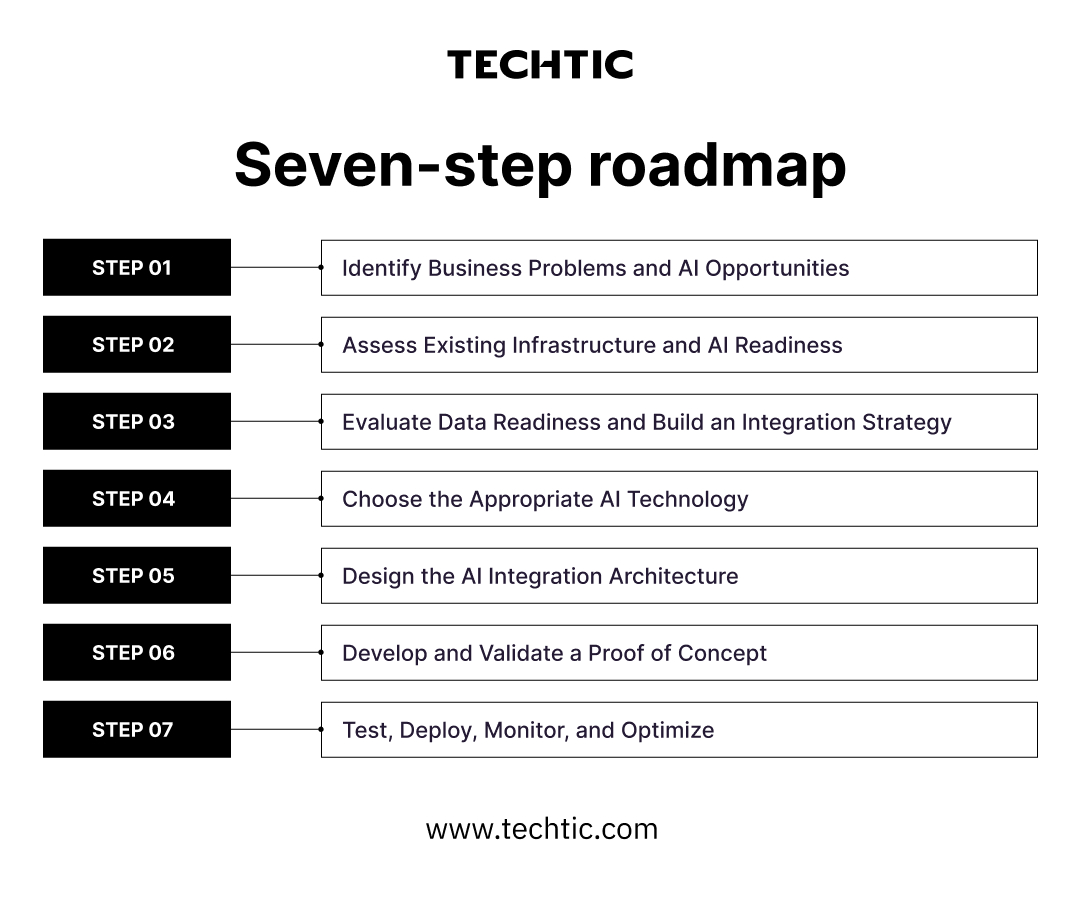
Step 1: Identify Business Problems and AI Opportunities
List processes with high volume, repeated decisions, or slow handoffs, and define the metric each should improve. Rank candidates by value and feasibility. Common bottleneck: starting from a tool (“we need a chatbot”) instead of a problem.
Step 2: Assess Existing Infrastructure and AI Readiness
Inventory the systems involved, their APIs, hosting, security constraints, and your team’s skills. Readiness is organizational as well as technical: Lee et al. (2023) identified 70 themes across organizational, information systems, technological, and people dimensions in AI implementation research. Key decision: modernize a legacy system first, or integrate around it through middleware.
Step 3: Evaluate Data Readiness and Build an Integration Strategy
Map where the required data lives, who owns it, how fresh it is, and how clean. Then decide how it moves: real-time APIs, scheduled pipelines, or event streams. This is where AI data integration happens: deduplication, consistent customer and product IDs across CRM and ERP, and access rules. Common bottleneck: departmental silos with no shared identifiers.
Step 4: Choose the Appropriate AI Technology
Match the model to the task: predictive machine learning for scoring and forecasting, LLMs for language, RAG for answers grounded in your documents, and agents for multi-step work. Choose between third-party APIs, open-source models, or custom AI product development based on accuracy needs, data sensitivity, and cost.
Step 5: Design the AI Integration Architecture
Define how requests flow between systems and models, where prompts and business rules live, how user permissions carry through, and what happens when a model fails or slows down. Plan logging, cost limits, and fallbacks from day one. Customer-facing features often mean extending an existing web application rather than building a new one.
Step 6: Develop and Validate a Proof of Concept
Build a narrow version on real data for a small user group, and measure it against the baseline from Step 1. Example: an assistant that drafts replies inside the existing help desk for one support queue before it reaches every team.
Step 7: Test, Deploy, Monitor, and Optimize
Test for accuracy, edge cases, security, and load, then roll out in phases. In production, monitor output quality, latency, cost per request, and model drift, and adjust prompts or retrain models as data changes.
What Are the Different AI Integration Approaches and Architectures?
Most businesses use one of seven integration patterns, often in combination; the right choice depends on how many systems are involved, how fast responses must be, and how sensitive the data is.
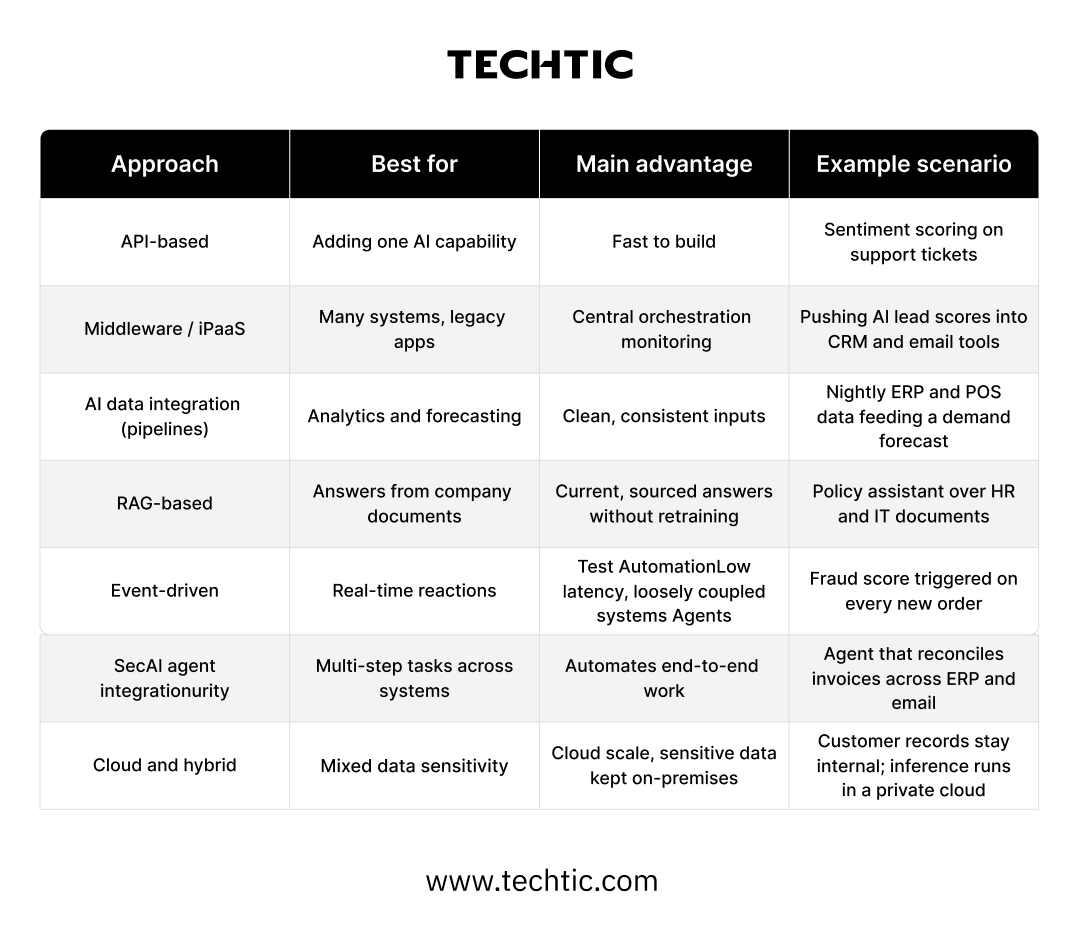
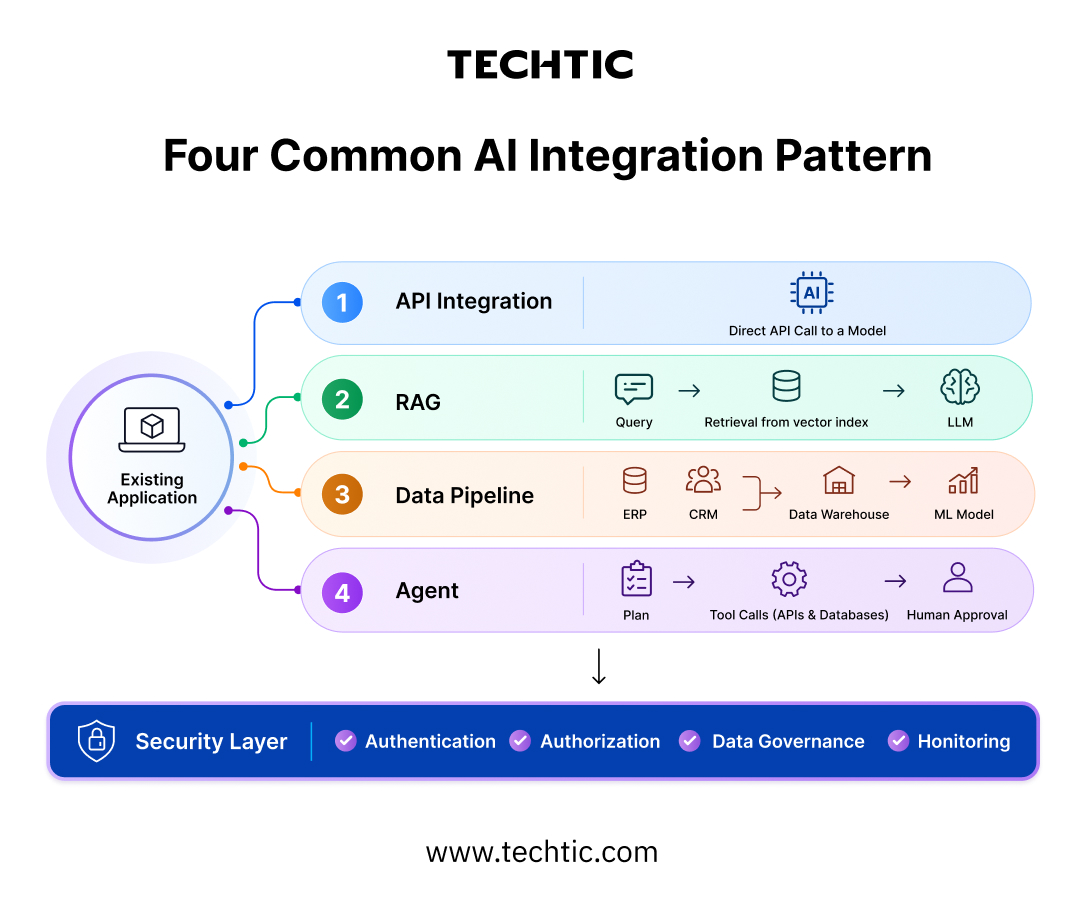
Generative AI integration usually combines an LLM API, a RAG layer that retrieves your own content, and a prompt architecture that adds business context and rules. Haki et al. (2025) also recommend a trusted environment for secure data access, privacy, and content monitoring, which applies well beyond Salesforce.
Third-Party AI Models vs. Custom AI Solutions
Integrating a third-party model through an API is faster and cheaper to start, and suits common tasks such as summarizing, drafting, or classifying text. A custom solution makes sense when your data is the differentiator, accuracy requirements are strict, or regulations limit where data can go.
Many businesses combine both: a third-party LLM, integrated through services such as Claude AI development, wrapped in custom retrieval, business logic, and guardrails.
Common AI Integration Challenges and How Businesses Can Overcome Them
The hardest AI integration problems are rarely the model; they are connectivity, data, governance, and people. MuleSoft’s 2025 research found the average enterprise runs 897 applications, with only 29% of them integrated, and 41% of IT leaders said old architecture got in the way of using data for AI. BCG’s 10-20-70 model makes the same point: 10% of AI effort goes into algorithms, 20% into technology and data, and 70% into people and processes.
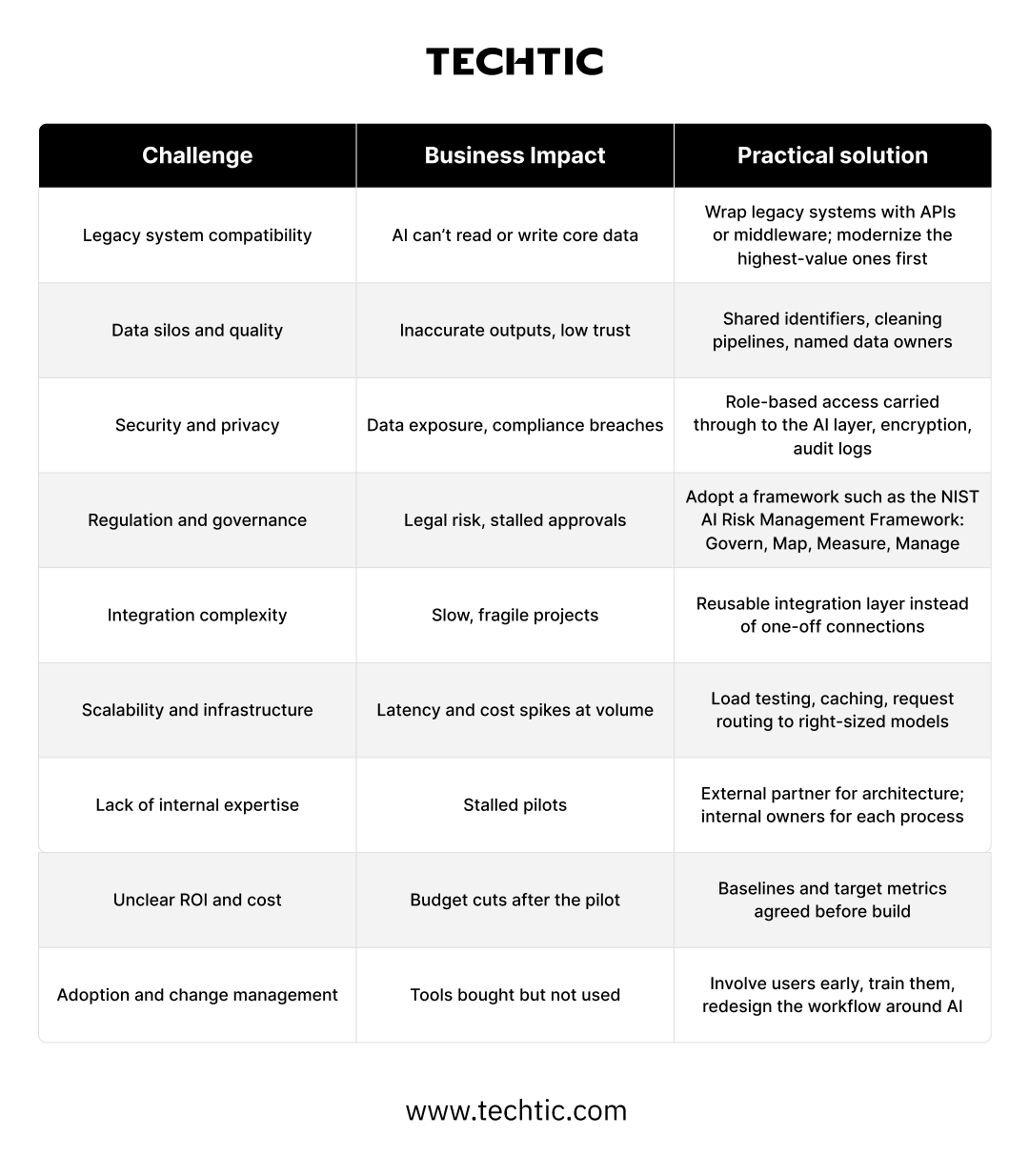
The research agrees. Sánchez (2025) found that organizations investing in technical deployment but not in leadership, training, and stakeholder dialogue put generative AI value at risk.
How Much Does AI Integration Cost for a Business?
AI integration cost depends mostly on how many systems must connect, how ready your data is, and whether you use existing models or build custom ones; there is no reliable single price. The main cost drivers are use-case complexity, number of integrations, data preparation, model and API usage fees, custom model development, cloud infrastructure, security and compliance work, and ongoing maintenance.
Usage-based costs deserve attention early: LLM API fees grow with volume and prompt length, so architecture choices such as caching and model routing affect running costs as much as build costs.
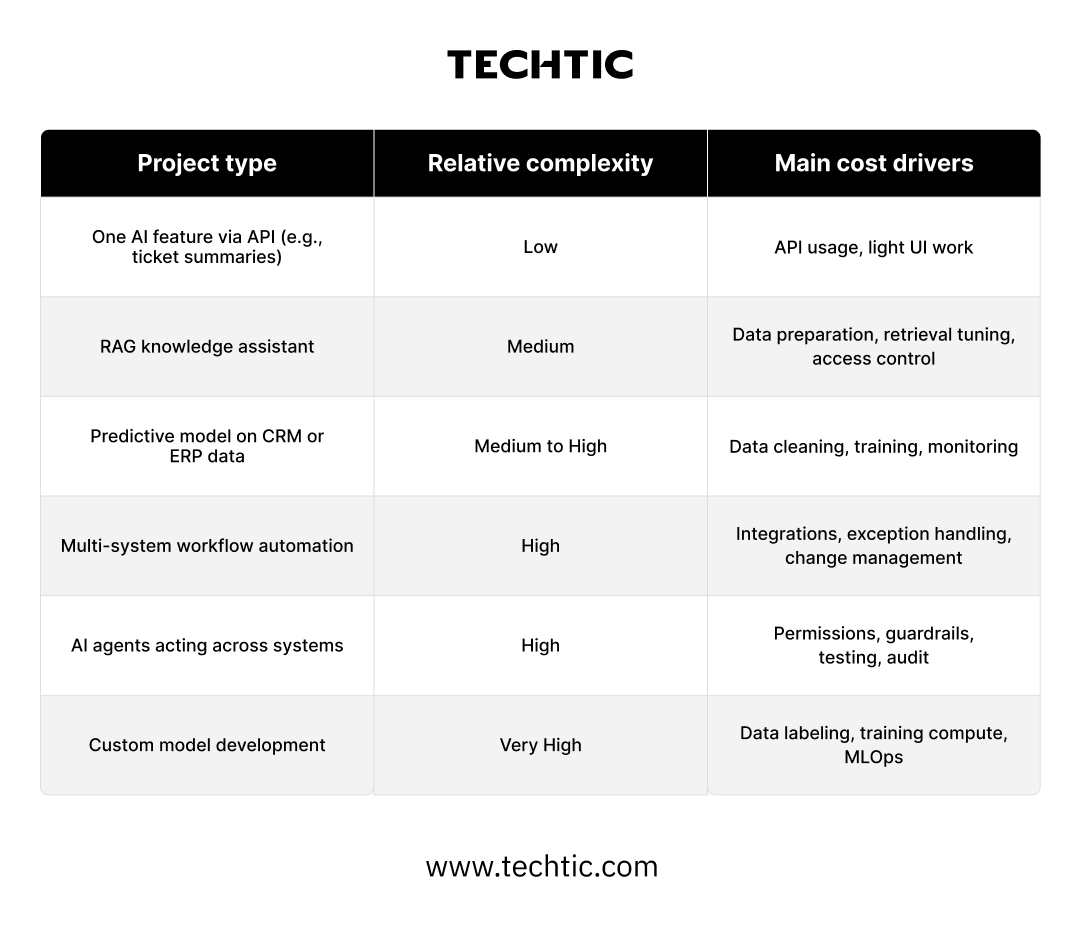
A scoped proof of concept is the most dependable way to estimate full cost, because it surfaces data and integration issues before the main budget is committed.
How to Measure the ROI of AI Integration
Measure AI integration ROI by recording a baseline before launch, tracking a few process-level KPIs after it, and comparing the value gained with the full cost of building and running the solution. Measurement itself pays off: in BCG’s Applied AI Index 2026, companies tracking AI directly in the P&L realized three times the AI value of companies that didn’t formally measure it.
Useful KPIs include manual processing time, operational cost, employee productivity, support resolution time, conversion rate, forecast accuracy, error rate, AI response time and reliability, and cost per automated task. Pick the two or three tied to your original business problem.
Illustrative ROI calculation (hypothetical figures):
- A support team handles 10,000 tickets a month at 6 minutes each.
- AI-drafted replies cut handling to 4 minutes, saving about 333 hours a month.
- At a $40 loaded hourly cost, that is about $160,000 a year.
- Year-one cost: $70,000 to build plus $60,000 to run, so $130,000.
- Year-one ROI: ($160,000 − $130,000) ÷ $130,000 ≈ 23%. Year two, with running costs only: ($160,000 − $60,000) ÷ $60,000 ≈ 167%.
The structure matters more than the numbers: savings must come from a measured baseline, and costs must include build, run, and maintenance.
How to Choose the Right AI Integration Services Provider
Choose an AI integration services provider that can connect models to your real systems and data, not just build a demo. Look for:
- AI consulting experience that starts from business problems and ROI.
- Enterprise integration expertise with CRM, ERP, APIs, and middleware.
- Data engineering for pipelines, quality, and governance.
- AI/ML and generative AI integration services, including model selection and evaluation.
- RAG and agentic AI expertise with permission-aware design.
- Security and governance practices such as access control, audit logs, and privacy compliance.
- Custom software development for the interfaces people actually use.
- Post-deployment support for monitoring, retraining, and cost control.
Ask for case studies that show integration with existing platforms and measured outcomes. Techtic’s AI and software development teams cover these areas, from strategy through production support.

Real-World Examples of AI Integration by Techtic
Each project below connected AI capabilities to a working product, its data, and its users. Details and results come from Techtic’s published case studies.
HEP: Turning a Standalone AI Model into an Integrated Learning Platform
Haute École de Psychothérapie had built an AI model that simulates therapy sessions as patient, supervisor, and professor, but it existed in isolation, with no interface, analytics, or collaboration tools. Techtic built the platform around it: AI engine integration, AI-driven chat simulations, an instant-feedback quiz engine, dashboards, and an admin toolkit with AI versioning, all with GDPR-compliant anonymization, encryption, and role-based access. HEP reported a 94% increase in student engagement and an 89% increase in faculty monitoring efficiency.
Read the HEP case study.
Auggie: Making AI Research Output Trustworthy
Auggie needed AI-generated customer personas that stayed consistent and explainable. Techtic built guided brand onboarding with document ingestion, version-controlled personas, real-time AI focus groups grounded in brand memory, and human-in-the-loop controls, using OpenAI and Pinecone. Reported results: a 92% increase in research efficiency and a 94% reduction in insight generation time.
Read the Auggie case study.
Hu Capital: Embedding an AI Assistant in a Professional Network
Hu Capital’s platform combines networking, curated content, and career tools. Techtic integrated an OpenAI-powered assistant, “Ask Huey,” that offers career and entrepreneurship advice within the platform, alongside content discovery, privacy controls, and a Next.js, Node.js, and Python stack.
Read the Hu Capital case study.
More projects are in Techtic’s portfolio.
The Future of AI Integration in Business
AI integration is moving from single features toward connected systems where AI agents act across applications, under human oversight and continuous monitoring.
- Agentic workflows: In BCG’s 2026 index, 42% of companies expect AI agents to act autonomously by 2030, yet only 5% have the full set of controls in place today.
- AI inside core platforms: Dziembek and Turek (2025) describe ERP systems evolving from reactive tools toward adaptive, cognitive, and autonomous systems.
- Connected data ecosystems: Agents and models are only as useful as the data they can reach, which makes integration architecture a strategic asset.
- Human-in-the-loop by design: Approval steps for consequential actions will become standard practice.
- Governance and observability: Frameworks such as NIST’s Generative AI Profile (2024) push teams to log, measure, and manage AI behavior continuously.
Conclusion: Build a Connected, AI-Ready Business
Successful AI integration starts with a business objective, depends on connected and trustworthy data, and runs on an architecture that can scale and be governed. The model is the easiest part to change; the integration layer, data foundation, and operating habits around it decide whether AI creates lasting value.
Looking to integrate AI into your existing business systems? Techtic helps businesses identify the right AI opportunities, engineer custom solutions, and connect intelligent capabilities with their existing technology ecosystem. Talk to our AI consulting experts to plan your integration journey.
FAQs
Q. What Is AI Integration in Business?
AI integration in business is the process of connecting AI models, such as machine learning, large language models (LLMs), or AI agents, to the software and data a company already uses, including CRM, ERP, and help desk systems. The AI then works with live business data inside existing workflows rather than in a separate tool.
Q. What Is the Difference Between AI Integration and AI Automation?
AI integration is the technical work of connecting AI to business systems and data. AI automation is one result of that work: tasks completed with less manual effort. A company can integrate AI purely to support decisions, but reliable AI automation depends on solid integration underneath.
Q. How Do You Integrate AI into Existing Business Systems?
Start with one business problem and a baseline metric. Then assess your systems and data, choose the model type, design how data flows between systems and the model, and test a proof of concept with real users. Deploy in phases and monitor accuracy, cost, and performance after launch.
Q. How Long Does AI Integration Take?
Timelines depend on scope, data readiness, and the number of systems involved. A narrow proof of concept built on an existing AI API typically takes weeks, while multi-system integrations, custom models, or AI agents usually take months. Data preparation and security reviews are the most common sources of delay.
Q. Can AI Be Integrated with Legacy Systems?
Yes. Legacy systems without modern APIs can be connected through middleware, integration platforms (iPaaS), database connectors, or custom API wrappers. Many businesses integrate around legacy systems first and modernize the highest-value ones later, rather than replacing core platforms before adding AI.
Q. How Do Businesses Integrate Generative AI into Existing Applications?
Most businesses connect a large language model through an API, add retrieval-augmented generation (RAG) so answers draw on company content, and design prompts that include business rules. Access controls, output monitoring, and usage limits complete the setup, and results appear inside the application people already use.
Q. What Is AI Agent Integration?
AI agent integration connects AI agents to business tools so they can plan and complete multi-step tasks, such as calling APIs, querying databases, and updating records. Safe agent integration limits each agent to its user’s permissions, logs every action, and requires human approval for consequential steps.
Q. Should Businesses Build Custom AI Solutions or Use Existing AI APIs?
Existing AI APIs are faster and cheaper for common tasks like summarizing, drafting, or classifying text. Custom solutions make sense when proprietary data is a competitive advantage, accuracy requirements are strict, or regulations restrict where data can go. Many businesses combine both: a third-party model with custom retrieval and business logic.
Q. How Much Does AI Integration Cost?
AI integration cost depends on the number of systems involved, data readiness, model choice, usage-based API fees, infrastructure, security requirements, and ongoing maintenance. A single API-based feature sits at the low end, while custom models and multi-system AI agents sit at the high end. A scoped proof of concept gives the most reliable estimate.
Q. How Do You Measure the ROI of AI Integration?
Record baseline metrics before launch, such as processing time, cost per task, error rate, or conversion rate, and track the same metrics afterwards. Then compare the value gained with the full cost of building, running, and maintaining the solution. BCG’s 2026 research found that companies tracking AI in the P&L realize three times the AI value.
Q. How Is Business Data Kept Secure When Integrating AI?
Secure AI integration keeps existing user permissions in force at the AI layer, encrypts data in transit and at rest, logs every request, and limits what data reaches external models. Frameworks such as the NIST AI Risk Management Framework help organizations govern, map, measure, and manage AI risk.