Cloud-Native Architecture: A Practical Guide to Migrating Legacy Systems
Sector: AI + Data
Author: Nisarg Mehta
Date: 10/08/2026

Legacy systems still power critical business operations across industries. As customer expectations rise, workloads grow, and businesses adopt AI and digital products, companies are looking for more flexible ways to build, scale, and manage their applications.
The challenge lies in modernizing these systems while keeping business operations moving. Moving an existing application to the cloud can change its hosting environment without addressing the architecture behind it. Cloud-native modernization takes a deeper approach, reshaping applications to support faster releases, flexible scaling, automation, and modern cloud capabilities.
This guide explains what cloud-native architecture means, why legacy system migration matters, how to choose the right cloud migration strategy, and how to approach modernization without turning it into a high-risk, all-at-once project.
The Growing Shift Toward Cloud-Native Applications
The market reflects a strong shift toward cloud-native technologies and application modernization.
The global cloud-native applications market was valued at USD 10.44 billion in 2025 and is projected to reach USD 59.83 billion by 2034, growing at a CAGR of 21.25%. Another estimate places the market at USD 11.18 billion in 2025, reaching USD 33.37 billion by 2030.
A few trends stand out:
- Public cloud holds the largest share at 53.89% in 2026, while hybrid cloud is growing rapidly.
- Large enterprises lead adoption, with SMEs showing strong growth.
- BFSI leads by industry, while healthcare is emerging as a fast-growing segment.
- India’s cloud-native application market is projected to grow from USD 3.03 billion in 2026 to USD 20.12 billion by 2034.
The broader shift is that businesses are investing in more scalable and adaptable technology foundations. For organizations running critical workloads on aging infrastructure, cloud-native modernization is becoming an important step toward supporting faster innovation and future growth.
What Is Cloud-Native Architecture?
Cloud-native architecture is an approach to designing, building, deploying, and operating applications around the capabilities of cloud computing.
A traditional application can move from an on-premises server to a cloud virtual machine with minimal changes. This creates a cloud migration, while the application continues to follow its original architecture and operating model.
Cloud-native applications are designed to make practical use of automation, elastic scaling, resilient infrastructure, continuous delivery, and modern monitoring. This approach gives teams greater flexibility to develop, release, scale, and manage applications as business needs evolve.
Core Building Blocks of Cloud-Native Architecture
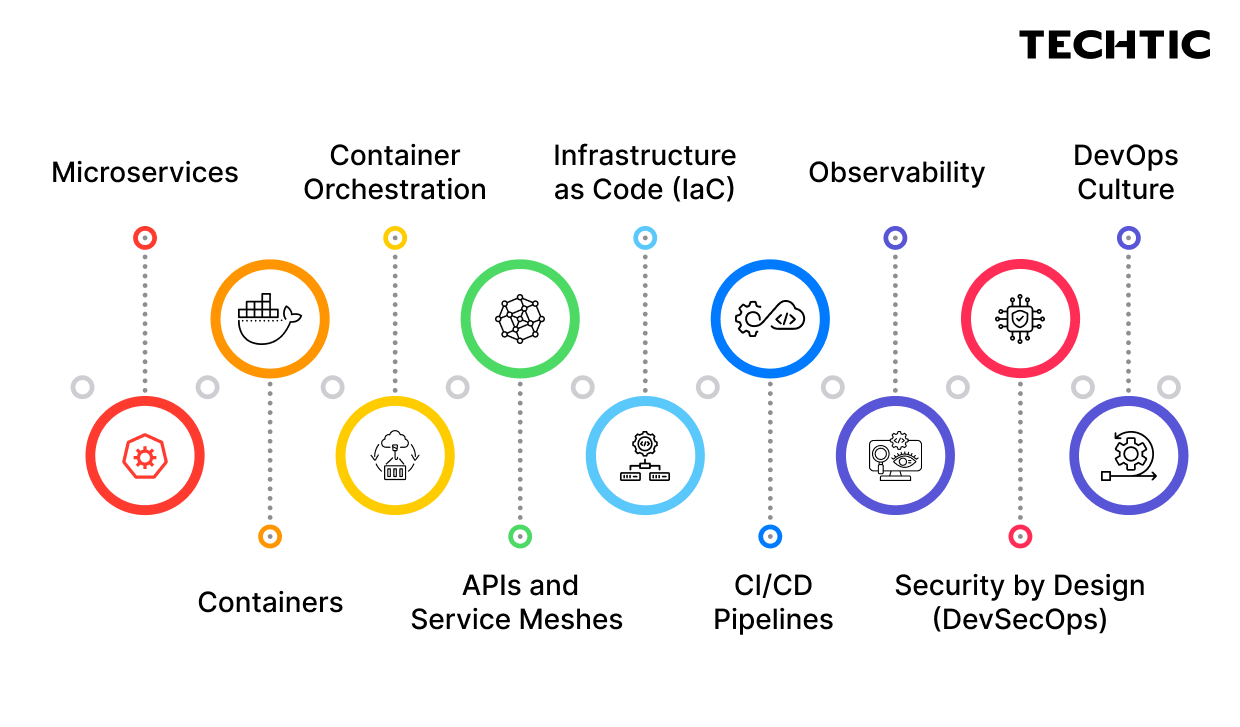
1. Microservices
Microservices divide an application into smaller, independently deployable services. Each service typically handles a specific business capability, allowing teams to update and scale individual components based on demand.
This approach works well for applications that require frequent releases or independent scaling, while the architecture should match the actual business and technical requirements.
2. Container
Containers package application code, libraries, and dependencies into portable units. They create consistent environments across development, testing, and production, making application deployment more predictable.
3. Container Orchestration
Platforms such as Kubernetes automate container deployment, scaling, service discovery, and workload management across cloud infrastructure.
4. APIs and Service Meshes
APIs provide defined interfaces for communication between applications and services. API gateways can manage routing and authentication, while service meshes help control service-to-service communication, traffic, and security within distributed applications.
5. Infrastructure as Code
Infrastructure as Code (IaC) manages cloud infrastructure through version-controlled configuration files. Tools such as Terraform help teams create repeatable environments, automate provisioning, and maintain greater consistency across deployments.
6. CI/CD Pipelines
Continuous integration and continuous delivery automate application building, testing, and deployment. Automated pipelines help teams release smaller changes more frequently and create a consistent path from development to production.
7. Observability
Logs, metrics, and distributed traces give teams visibility into application and infrastructure performance. This information helps engineers understand system behavior, monitor trends, and respond quickly to areas that need attention.
8. Security by Design
Cloud-native security integrates practices such as identity and access management, vulnerability scanning, image scanning, encryption, and compliance checks throughout development and deployment. DevSecOps brings security into the engineering workflow, making it a shared responsibility across development, operations, and security teams.
9. DevOps Culture
DevOps brings development and operations teams together around application delivery, reliability, monitoring, automation, and continuous improvement.
Together, these building blocks create the foundation for modern cloud-native application development. They also support a broader cloud enterprise architecture, where applications, infrastructure, data, security, and cloud services work together as a connected technology ecosystem.
Why Legacy Systems Hold Businesses Back
Legacy systems can support critical business operations for years. The challenge starts when their architecture makes everyday changes slower, more expensive, and harder to manage.
Technical debt grows: Years of patches, workarounds, and custom integrations can make systems harder to understand and update.
Scaling takes more effort: Monolithic applications often scale as a single unit, even when only one feature needs additional capacity.
Releases take longer: A small update may require testing across the entire application, slowing down feature delivery.
Security becomes harder to manage: Older frameworks, libraries, and authentication methods can make security updates more complex.
Maintenance uses more resources: Teams may spend significant time maintaining aging infrastructure instead of developing new capabilities.
Modern integrations take more work: AI tools, analytics platforms, SaaS applications, and modern APIs often need capabilities that older systems lack.
Signs It’s Time to Migrate
Every legacy application has a different modernization path. Migration becomes worth exploring when several of these signs appear:
- Releases take weeks or months.
- Scaling requires additional hardware or excess capacity.
- A single issue can affect the wider application.
- Maintenance costs keep increasing.
- Only a few team members understand the system.
- Applying security updates takes significant effort.
- Customers experience slow performance during peak traffic.
- Adding AI, analytics, or new integrations requires major changes.
When three or more of these signs apply, a structured legacy system migration assessment can help identify the right next step.
Choosing the Right Cloud Migration Strategy
Every application needs a migration approach based on its business needs, technical complexity, and modernization goals.
The 6 Rs of cloud migration provide six common approaches to guide these decisions.
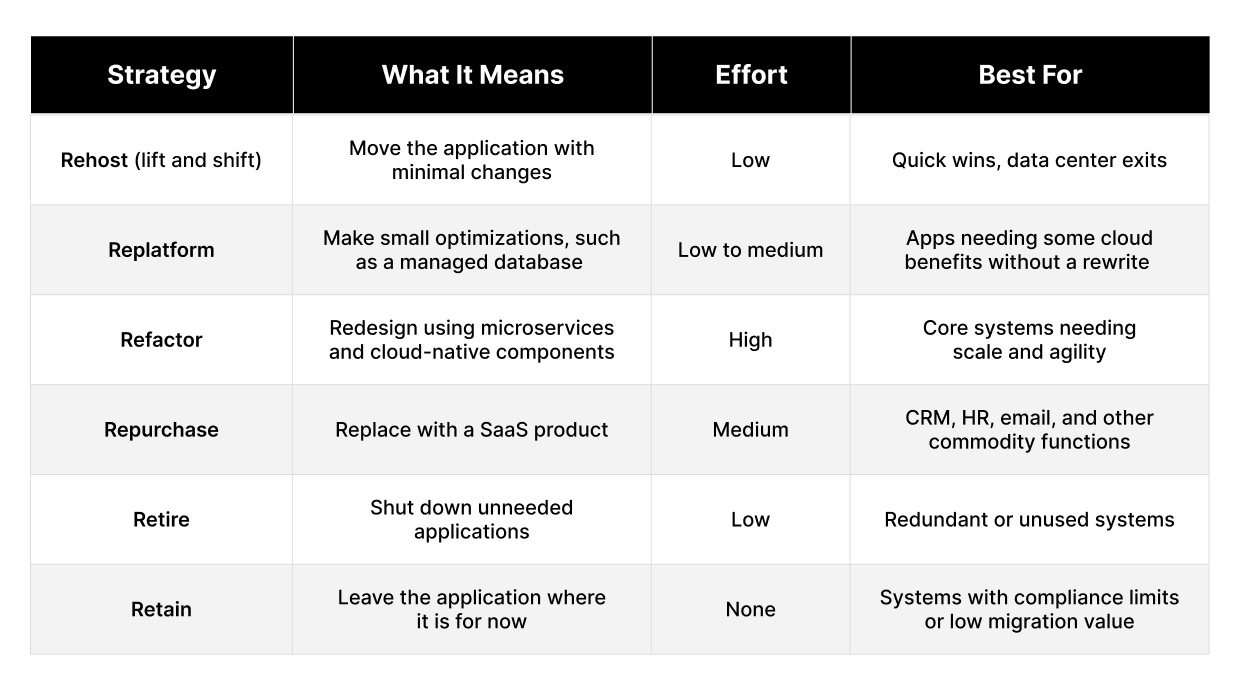
A few practical considerations
Rehosting is often a starting point, not the destination. It can move workloads to the cloud quickly, but the application may still retain its original limitations.
Refactor where the business value justifies it. Frequently changing systems or workloads with unpredictable traffic are stronger candidates for deeper modernization.
Retire what you no longer need. Application portfolios often contain systems that can simply be switched off, reducing both migration scope and operating costs.
Consider compliance early. Workloads with strict data residency or regulatory requirements may fit a private cloud architecture better than a public cloud. Many enterprises ultimately use a hybrid approach.
An experienced cloud migration company can help evaluate these trade-offs and build a workload-specific migration strategy.
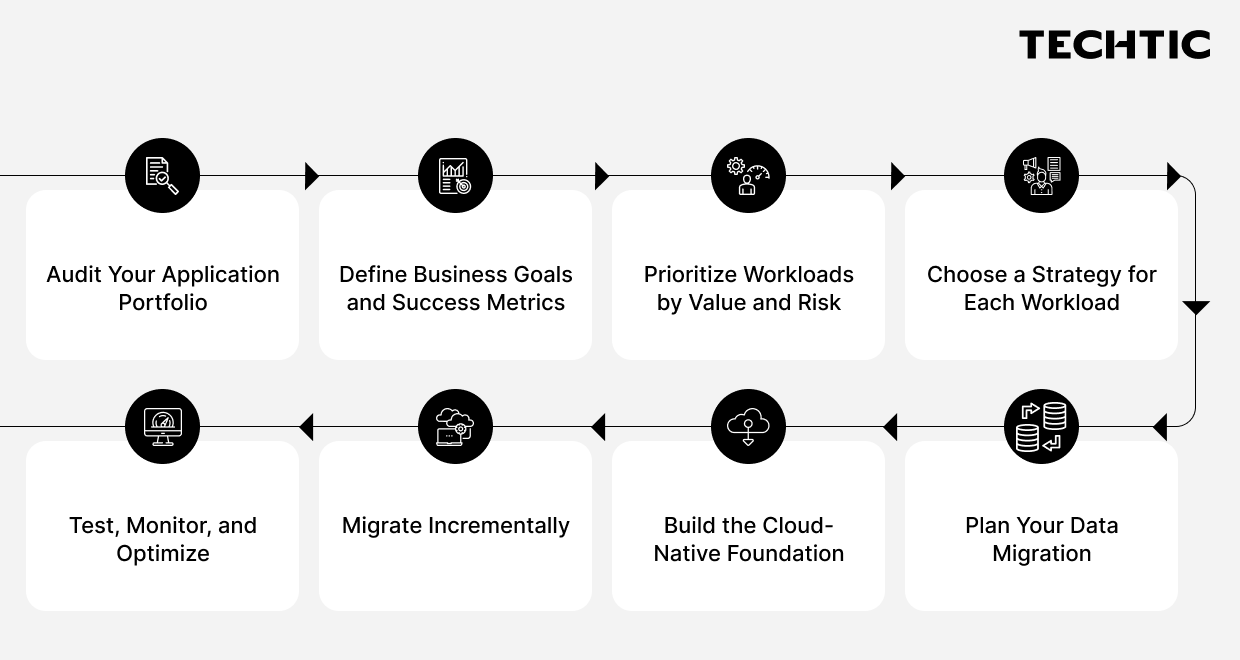
Step-by-Step Roadmap for Migrating Legacy Systems to the Cloud
A successful migration is usually incremental. Moving everything at once increases the number of unknowns and makes problems harder to isolate.
Step 1: Audit Your Application Portfolio
Document each application, its owner, dependencies, integrations, data flows, business importance, and infrastructure. Identify hidden dependencies such as scheduled jobs, databases, authentication systems, and third-party services.
Step 2: Define Business Goals and Success Metrics
Start with the business outcome. Define clear goals such as reducing costs, improving uptime, increasing deployment speed, or supporting new capabilities. Set measurable targets to determine the right cloud migration services and solutions.
Step 3: Prioritize Workloads by Value and Risk
Rank applications by business impact, technical complexity, dependencies, and migration risk. A moderately valuable, lower-risk application is often a good starting point. It allows teams to validate their cloud environment and migration process without putting critical operations at unnecessary risk.
Step 4: Choose a Strategy for Each Workload
Apply the 6 Rs to every application and document the reasoning. This creates a clear cloud migration strategy and gives technical and business stakeholders a common basis for decision-making.
Step 5: Plan Your Data Migration
Data migration is often more complicated than application migration. Plan for data cleansing, validation, security, transfer methods, downtime, and rollback.
Large or interconnected databases may require specialized cloud data migration services. For critical workloads, running old and new environments in parallel can provide additional validation before cutover.
Step 6: Build the Cloud-Native Foundation
Before moving workloads, establish:
- CI/CD pipelines
- Infrastructure as Code
- Container registries and orchestration
- Identity and access controls
- Security controls
- Monitoring, logging, and observability
Skipping this stage can simply move existing operational problems into the cloud.
A consistent cloud enterprise architecture helps different teams operate from the same foundation.
Step 7: Migrate Incrementally
Start with a pilot workload. Measure the results, address issues, improve the process, and then move to the next migration wave.
For complex monoliths, migrate functionality in smaller pieces rather than attempting a single large cutover.
Step 8: Test, Monitor, and Optimize
Migration does not end at go-live. Run performance and security tests, validate data, monitor real-world application behavior, and continue optimizing cost and reliability. Cloud-native architecture works best as an iterative operating model rather than a one-time transformation.
Key Patterns and Tools for Legacy Migration
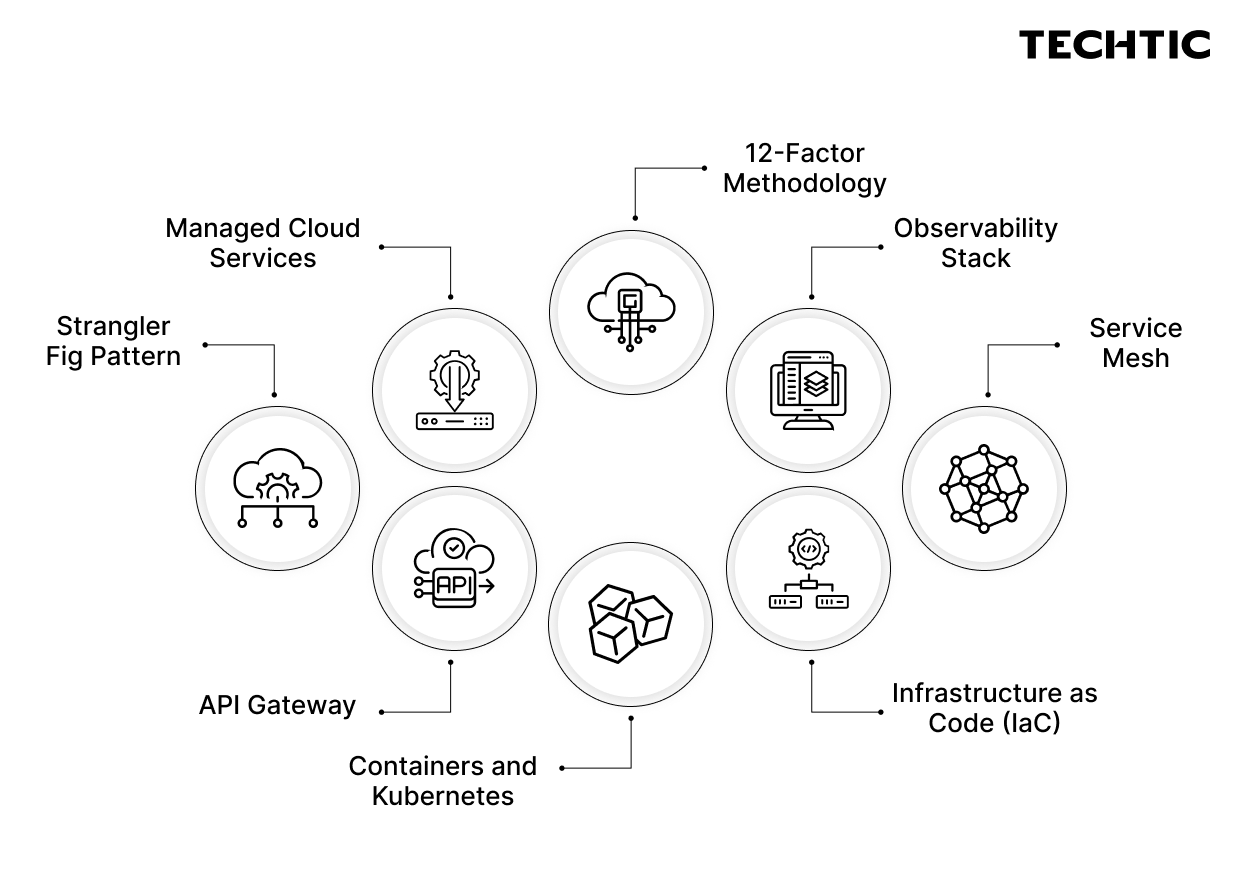
Several patterns are particularly useful during modernization.
Strangler Fig Pattern: Build new cloud-native services around the existing application and gradually move functionality away from the legacy system until it can be retired.
API Gateway: Provides a controlled entry point for routing, authentication, and traffic management and allows old and new components to operate together.
Containers and Kubernetes: Containers provide consistent packaging, while Kubernetes automates deployment, scaling, and self-healing.
Infrastructure as Code: Tools such as Terraform define infrastructure through version-controlled files, improving consistency and reducing manual errors.
Service Mesh: Helps manage secure communication, routing, and observability as the number of microservices increases.
Observability Stack: Metrics, logs, and tracing provide visibility into distributed applications.
12-Factor Methodology: Provides practices for building portable and scalable applications and can serve as a useful checklist when refactoring legacy workloads.
Managed Cloud Services: Managed databases, queues, storage, and security services can reduce operational overhead. They should be selected based on actual workload requirements rather than technology trends.
Common Challenges and How to Avoid Them
Data migration complexity
Large databases create risks around data loss, inconsistency, and downtime. Use staged transfers, validation checks, and tested rollback procedures.
Downtime and disruption
Phased rollouts, blue-green deployments, parallel environments, and the strangler fig pattern can reduce migration risk.
Skill gaps
Cloud-native application development requires experience with containers, distributed systems, DevOps, security, and cloud services. Internal training or support from a cloud migration company can help close these gaps.
Cost overruns
Cloud resources are easy to provision, but that does not guarantee lower costs. Set budgets, tag resources, monitor usage, and establish governance from the beginning.
Over-splitting the monolith
Breaking a monolith into too many services can create more complexity than it removes. Define service boundaries around meaningful business capabilities.
Vendor lock-in
Provider-specific services can accelerate development but may reduce future portability. Use open standards where they provide meaningful value.
Security and compliance gaps
Build security into the migration process. Review access controls, encryption, vulnerability management, logging, data residency, and compliance requirements early.
Best Practices for a Smooth Migration
- Start small, learn from the first migration wave, and scale what works.
- Tie every migration decision to a measurable business outcome.
- Automate testing, deployment, and infrastructure wherever practical.
- Design for failure and build recovery mechanisms into the architecture.
- Align migrations with the wider cloud enterprise architecture.
- Involve security and compliance teams from the beginning.
- Monitor cloud cost and application performance continuously.
- Choose cloud computing services according to workload requirements.
- Keep business stakeholders involved throughout planning and validation.
Techtic Solutions: Your Trusted Cloud Migration Partner
At Techtic, we help businesses modernize legacy systems and move to scalable, cloud-native platforms.
Our cloud migration services cover assessment, migration strategy, cloud-native application development, data migration, and ongoing optimization. We tailor each cloud migration solution around your applications, business goals, technical requirements, and compliance needs across public, private, or hybrid cloud environments.
The goal is simple: build a modern technology foundation that supports growth, scalability, and faster innovation while keeping the migration journey practical.
If you are planning your legacy system migration, talk to our cloud experts to explore the right approach for your business.
FAQs
Q. What is cloud-native architecture in simple terms?
Cloud-native architecture is an approach to building applications so they can take advantage of cloud capabilities such as automation, elasticity, resilience, and independent scaling.
It commonly uses independently deployable services, containers, automated pipelines, and cloud infrastructure designed for continuous operation.
Q. How long does cloud migration take for a legacy system?
It depends on application size, complexity, dependencies, data volume, and migration strategy.
A simple rehost can take weeks, while refactoring a large monolith can take many months. Incremental migration allows organizations to deliver value throughout the process.
Q. What is the difference between cloud migration and cloud-native modernization?
Cloud migration moves an application to the cloud, potentially with few changes.
Modernization goes further by redesigning the application to use capabilities such as microservices, containers, autoscaling, automation, and managed cloud services.
Q. Is microservices always the right choice?
No.
Microservices provide flexibility and independent scaling but introduce additional operational complexity. Some applications are better suited to replatforming or a modular monolith.
The architecture should reflect the application’s scale, team capabilities, release requirements, and business goals.
Q. What is the strangler fig pattern?
The strangler fig pattern gradually replaces a legacy application rather than replacing it in one large cutover.
New services are built around the existing system, and functionality is progressively moved to the new architecture until the legacy components can be retired.
Q. When should I choose private cloud over public cloud?
Private cloud architecture can suit workloads with strict compliance, data residency, security, or performance requirements.
Many organizations use a hybrid model so individual workloads can run in environments that match their requirements.
Q. Do I need a cloud migration company?
Not always. Organizations with strong internal cloud, architecture, security, and DevOps capabilities may manage migration themselves.
A specialist cloud migration company can be particularly valuable when systems are highly interconnected, data volumes are large, downtime must be minimized, or internal cloud expertise is limited.