AI Chatbot Services: Types, Features, Benefits, and Development Costs
Sector: AI + Data
Author: Nisarg Mehta
Date: 08/18/2026

Most customer support teams hit the same wall eventually. Volume grows, response times slip, and hiring more agents doesn’t scale cleanly with demand. An AI chatbot doesn’t solve every business problem, but for organizations handling high volumes of repetitive queries, running 24/7 operations, or trying to personalize engagement at scale, it changes what’s operationally possible.
This guide covers what you genuinely need to know before building or buying an AI chatbot: how they actually work, the different types available, which features matter, what development realistically costs, and how to avoid the mistakes that turn promising projects into expensive underperformers.
What Are AI Chatbot Services?
AI chatbot services are software solutions that use artificial intelligence, specifically natural language processing (NLP), machine learning, and increasingly large language models (LLMs), to understand user input and generate relevant, contextual responses in real time.
The distinction from older, rule-based chatbots matters. Traditional chatbots follow rigid decision trees: if the user says X, respond with Y. They break the moment a user phrases something unexpectedly or asks something outside the script. AI-powered chatbots understand intent rather than matching keywords. They can handle ambiguous phrasing, follow multi-turn conversations, retrieve information from connected business data, and generate responses that actually make sense in context.
Modern AI chatbot services typically combine several technologies:
- NLP to parse user intent and extract meaning from natural language
- LLMs (like GPT-4, Claude, Gemini, or Llama) to generate fluent, context-aware responses
- Retrieval-Augmented Generation (RAG) to ground responses in company-specific knowledge rather than relying on general model training
- APIs and integrations to connect with CRMs, helpdesks, databases, and business systems
- Analytics layers to track performance and continuously improve
They’re deployed across websites, mobile apps, messaging platforms, enterprise portals, and voice interfaces, wherever customers or employees need fast, accurate assistance.
How Do AI Chatbots Work?
The workflow behind a modern AI chatbot is more structured than it appears from the user’s side. Here’s what happens between a user typing a question and receiving a useful answer:
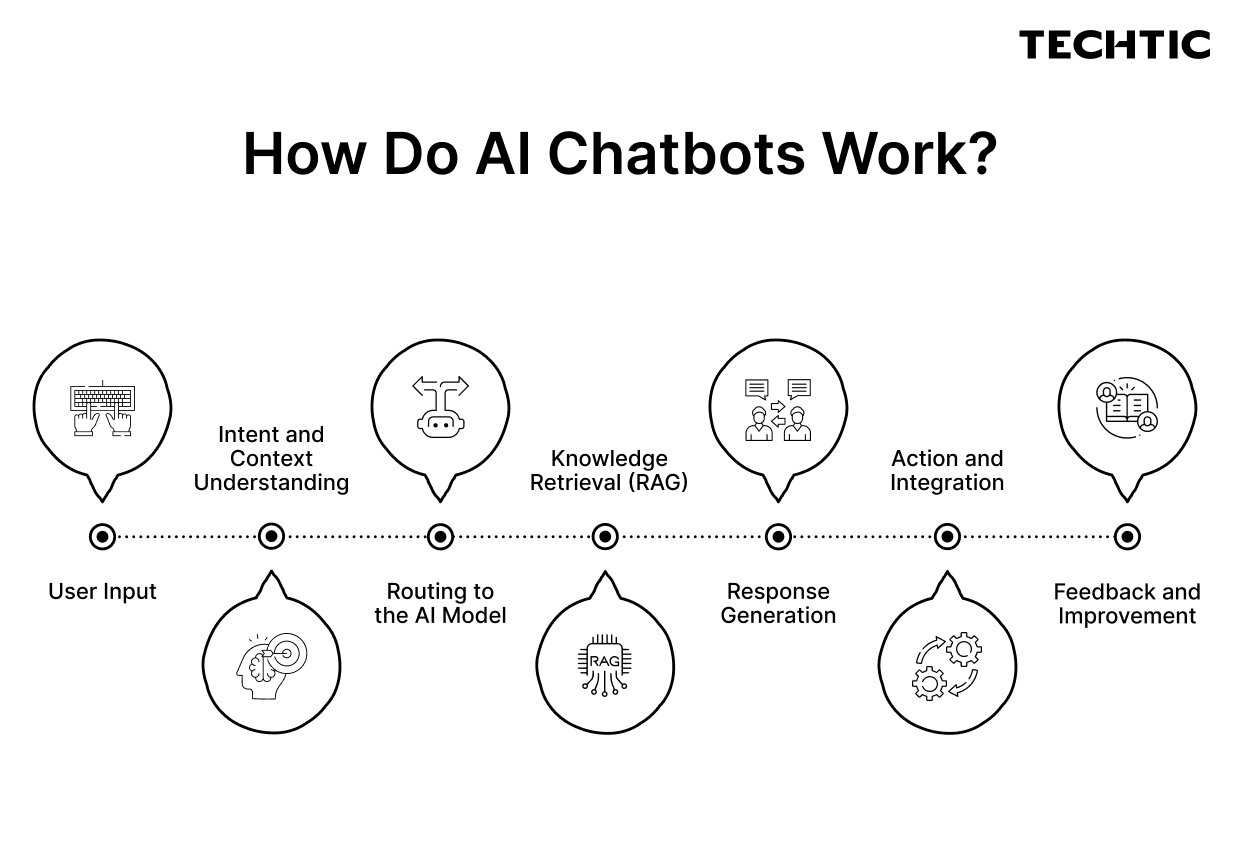
- User Input The user sends a message, a question, a request, or a command, via text or voice.
- Intent and Context Understanding NLP models parse the message to identify intent (what the user wants) and extract relevant entities (product name, account number, date, etc.). The system also considers conversation history so the response is contextually appropriate.
- Routing to the AI Model The interpreted input is passed to an LLM or a specialized AI model trained or fine-tuned for the use case.
- Knowledge Retrieval (RAG) For business-specific answers, the chatbot retrieves relevant information from a connected knowledge base, internal documents, database, or CRM record, rather than relying solely on what the LLM was pre-trained on. This is what makes a chatbot genuinely useful for enterprise use rather than producing plausible-sounding but inaccurate answers.
- Response Generation The model generates a response using the retrieved context and the user’s input. Guardrails filter the output for accuracy, tone, safety, and scope before it reaches the user.
- Action and Integration Where the chatbot can take action, raising a support ticket, checking order status, updating a CRM record, triggering a workflow, it does so through API integrations with backend systems.
- Feedback and Improvement User interactions, escalations, and ratings feed back into analytics dashboards. Over time, this data is used to identify gaps, retrain models, and improve conversation flows.
The quality of each step determines the overall usefulness of the chatbot. A well-trained LLM with poor knowledge retrieval produces confident but wrong answers. Strong retrieval with weak guardrails creates security and compliance risks. All components need to work together.
Types of AI Chatbots
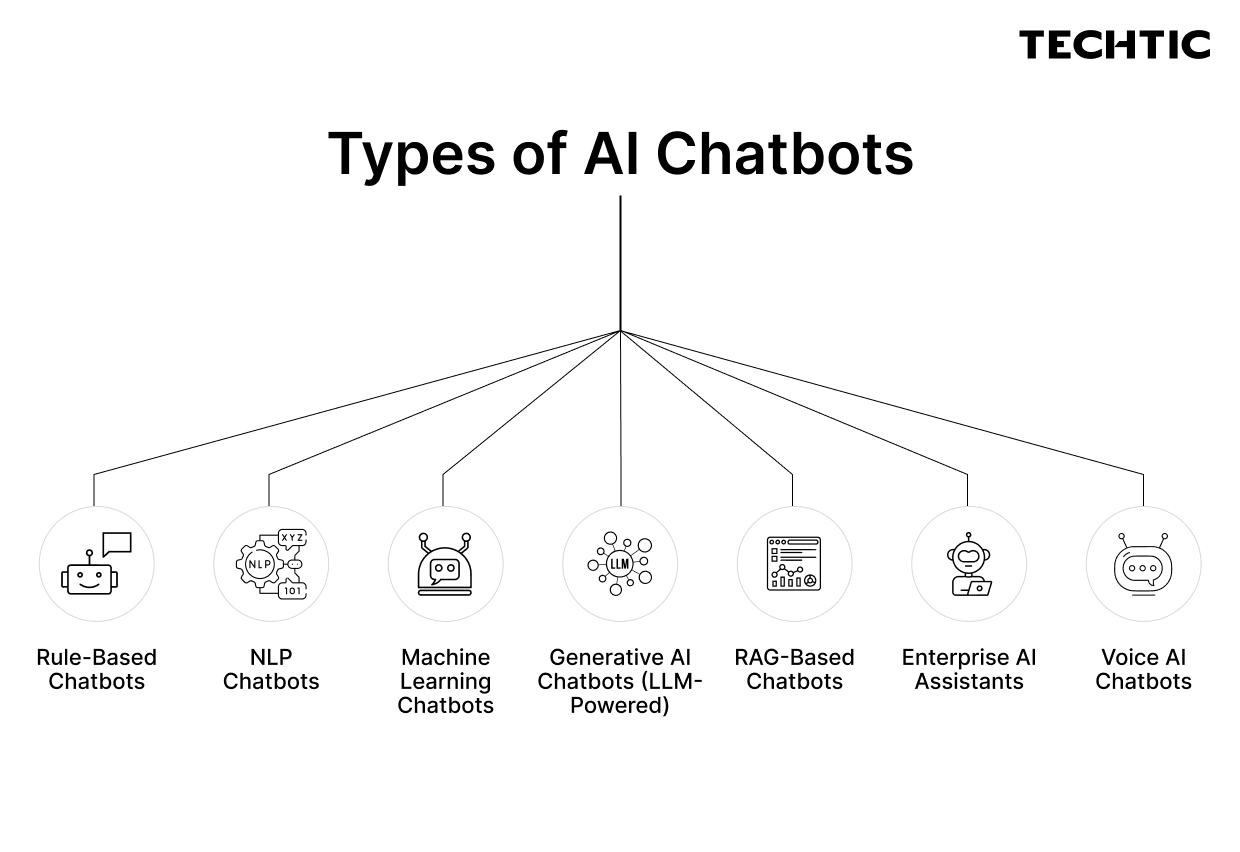
Not every AI chatbot is the same, and matching the right type to your use case is the first major architectural decision.
Rule-Based Chatbots
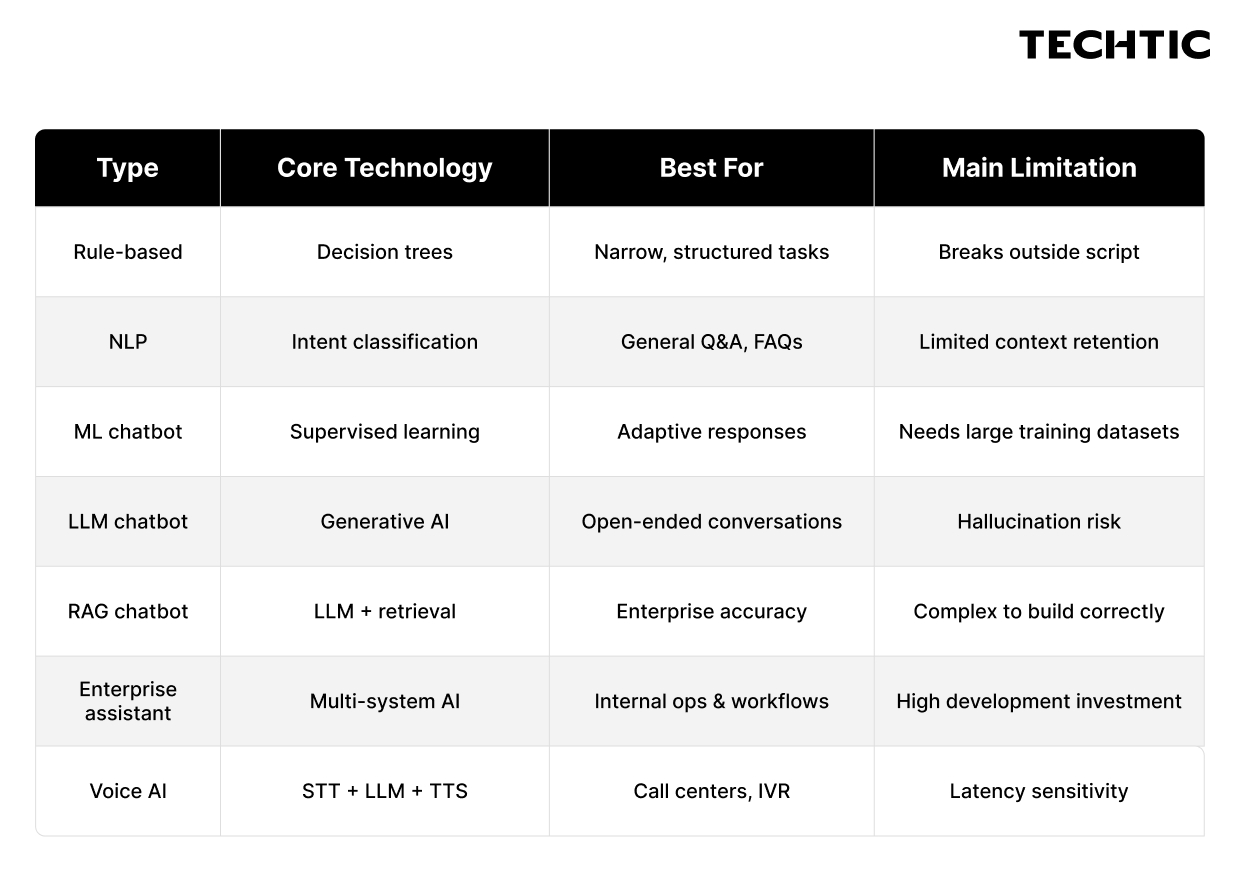
These follow pre-defined decision trees and keyword matching. They’re fast to build, predictable, and easy to control, but they fail outside their script. Best for highly structured, low-variation use cases like appointment booking confirmation or simple FAQ deflection. Not appropriate for complex conversations.
NLP Chatbots
NLP-powered chatbots understand natural language rather than exact keyword matches. They handle variation in phrasing, extract intent from context, and manage simple multi-turn exchanges. More flexible than rule-based bots but still limited by training data and domain specificity.
Machine Learning Chatbots
These improve over time using interaction data. Supervised or reinforcement learning models allow the chatbot to adapt its responses based on what’s worked historically. More capable than static NLP models but require significant training data and ongoing tuning.
Generative AI Chatbots (LLM-Powered)
Built on large language models, these chatbots generate responses dynamically rather than retrieving from fixed templates. They handle open-ended conversations fluently, adapt tone naturally, and manage complex queries well. The major risk, hallucination, is managed through RAG implementation and output guardrails.
RAG-Based Chatbots
Retrieval-Augmented Generation chatbots combine LLM fluency with grounded, retrieved knowledge. Rather than relying on what the LLM learned during pre-training, the chatbot searches a connected knowledge base at query time and uses the retrieved documents to inform its response. This is currently the most practical architecture for enterprise use cases where accuracy on company-specific information is non-negotiable.
Enterprise AI Assistants
These are sophisticated, multi-system AI solutions designed for internal enterprise use, HR queries, IT support, finance operations, internal knowledge management. They integrate with multiple enterprise systems (SAP, Workday, Salesforce, ServiceNow) and often include role-based access controls, audit logging, and compliance features.
Voice AI Chatbots
Text-based AI logic extended to voice interfaces via speech-to-text and text-to-speech layers. Used in call centers, smart devices, and IVR replacement. Latency and response time become critical quality factors.
Key Features of AI Chatbots
What separates a useful AI chatbot from an expensive liability is usually the feature set. Here’s what to understand and what to insist on.
Core Features
Natural Language Understanding (NLU) The ability to interpret what a user means, not just what they typed. Strong NLU handles typos, contractions, abbreviations, and colloquial phrasing without breaking the conversation.
Context Awareness and Multi-Turn Conversations A chatbot that can’t remember what was said two messages ago isn’t useful for anything complex. Context management across a full conversation session is non-negotiable for real support or sales use cases.
Knowledge Base Integration The chatbot should retrieve answers from your company’s actual documentation, policies, and data, not just respond from general LLM knowledge. This is what makes answers accurate for your specific business.
Human Handoff No chatbot handles everything. Clean escalation to a human agent, with full conversation context passed along, is essential for maintaining customer experience when the AI reaches its limits.
Omnichannel Deployment Customers don’t stay on one channel. A well-built AI chatbot deploys consistently across your website, mobile app, WhatsApp, Slack, email, or any other relevant channel with a shared conversation context.
Analytics and Reporting Conversation logs, deflection rates, escalation rates, resolution rates, and user satisfaction scores should all be accessible. Without measurement, you can’t improve.
Advanced and Enterprise Features
Retrieval-Augmented Generation (RAG) Connects the LLM to live, updated business data sources at query time. Critical for chatbots that need to answer questions about products, policies, accounts, or any information that changes over time.
CRM and ERP Integration The chatbot should be able to pull customer records, update account information, create tickets, and trigger workflows in your existing business systems, Salesforce, HubSpot, SAP, ServiceNow, Zendesk, or others.
Personalization Using authenticated session data or retrieved customer profiles, the chatbot addresses users by name, references their history, and tailors responses to their context.
Guardrails and Output Controls Enterprise deployments need content filters, topic boundaries, accuracy controls, and escalation triggers. Without guardrails, an LLM-based chatbot can produce responses that are off-brand, inaccurate, or compliance-problematic.
Multilingual Support For global businesses, multi-language capability, not just translation, but natural language understanding across languages, significantly expands the chatbot’s reach.
Role-Based Access Control Internal enterprise chatbots need to serve different users differently. An employee shouldn’t access executive-level financial data; a regional manager shouldn’t see another region’s records.
Security and Compliance Data encryption in transit and at rest, SOC 2 compliance, GDPR/HIPAA alignment, audit logging, and PII handling controls become mandatory in regulated industries.
Voice Capability Speech-to-text input and text-to-speech output extend the chatbot to phone-based and voice-interface channels.
Benefits of AI Chatbot Services
The business case for AI chatbots is strongest when tied to specific operational problems, not general promises.
24/7 Availability Without Proportional Staffing Cost A support team of 20 agents can’t staff three shifts economically. An AI chatbot handles queries at 2 AM Tuesday with the same quality as Monday afternoon. For businesses with global customer bases, this removes a structural limitation.
Deflection of Repetitive Queries Many support teams find that 40–60% of their inbound query volume is highly repetitive, order status, password resets, account updates, policy questions. A well-trained chatbot handles these consistently and at scale, freeing human agents for complex, high-value interactions.
Faster Response Times AI chatbots respond in seconds. In customer service contexts, response time directly affects satisfaction scores. In sales contexts, response latency affects lead conversion, the probability of qualifying a lead drops significantly when follow-up is delayed.
Lead Qualification and Sales Assistance Deployed on a sales website, an AI chatbot engages prospects, asks qualification questions, provides product information, and routes high-intent leads to sales reps, without requiring those reps to be available at every hour a prospect arrives.
Reduced Cost Per Interaction AI chatbot cost per resolved interaction is typically a fraction of human agent cost per interaction. As volume scales, the economic advantage grows. Note: this requires the chatbot to actually resolve queries, not just deflect them to a human, which requires proper training and knowledge base investment.
Consistent Quality Human agents have good days and bad days. AI chatbots deliver the same quality response at 9 AM and 9 PM, to the first customer and the thousandth.
Data and Insight Generation Every chatbot conversation is a data point. Aggregate conversation data reveals what customers actually ask about, where your FAQs have gaps, which products generate the most confusion, and where the buying process stalls.
AI Chatbot Use Cases Across Industries
eCommerce
Order tracking, returns initiation, product recommendations based on browsing history, size/compatibility questions, promotional code application, and abandoned cart recovery. The chatbot handles the high-volume transactional queries while passing complex complaints to human agents.
Healthcare
Patient intake, appointment scheduling and reminders, symptom pre-screening, insurance verification, post-visit follow-up, and medication information. Strict HIPAA compliance requirements govern data handling in this vertical.
Banking and Financial Services
Account balance inquiries, transaction history, fraud flagging, loan product information, branch/ATM locators, and document collection for loan applications. Security and regulatory compliance (PCI-DSS, SOC 2) are non-negotiable here.
SaaS and Technology
Product onboarding assistance, in-app support, troubleshooting guides, feature explanation, billing queries, and renewal support. A well-built chatbot can reduce time-to-value for new users significantly.
Education
Admissions information, course catalog queries, enrollment support, financial aid questions, and student services. For edtech platforms, chatbots support learner progression with personalized guidance.
Travel and Hospitality
Flight status, booking modifications, hotel policies, travel documentation requirements, loyalty point inquiries, and itinerary support. High query volume with time-sensitive information makes this a strong chatbot use case.
Real Estate
Property search assistance, virtual tour scheduling, mortgage pre-qualification questions, neighborhood information, and agent connection. Chatbots handle top-of-funnel inquiry volume efficiently.
B2B Enterprise
Internal IT helpdesk, HR query handling, procurement request assistance, and internal knowledge management. Enterprise AI assistants often generate strong ROI by reducing load on internal service departments.
AI Chatbot Development Process
Building an AI chatbot that actually delivers business value follows a defined sequence. Cutting corners on any of these stages usually shows up later as poor performance or expensive rework.
- Define Business Objectives What problem is this chatbot solving? What does success look like in measurable terms, deflection rate, response time, lead conversion, cost per interaction? Starting without clear objectives produces a chatbot optimized for nothing.
- Identify Target Users and Use Cases Who will use it, through which channels, and for what specific tasks? Map the top 10–20 query types you expect the chatbot to handle. This scopes the training and integration requirements.
- Select the Chatbot Architecture Based on your use cases, determine whether you need a simple NLP bot, an LLM-powered conversational agent, a RAG-based knowledge retrieval system, or a multi-system enterprise assistant.
- Choose the AI Model Select the LLM or AI engine, GPT-4, Claude, Gemini, Llama, or a domain-specific model. The choice depends on performance requirements, cost, data privacy, and whether you need on-premise deployment.
- Prepare and Connect Data This is consistently underestimated. Your knowledge base needs to be structured, accurate, and regularly maintained. Poor data produces a confidently wrong chatbot. CRM, ERP, and helpdesk integrations need to be mapped and tested.
- Design Conversation Flows Map the likely conversation paths for each use case. Define how escalations work, what happens when the chatbot can’t answer, and how edge cases are handled.
- Develop the Chatbot Build and configure the core chatbot logic, connect APIs, implement the RAG pipeline, build the admin interface, and create the frontend UI.
- Integrate Business Systems Connect CRM, helpdesk, ERP, or other backend systems. Test bidirectional data flow, the chatbot should be able to read from and write to connected systems reliably.
- Implement Security and Guardrails Apply content filters, topic boundaries, authentication, encryption, PII handling, and compliance controls appropriate to your industry.
- Test and Evaluate Test with real users, evaluate response accuracy against your intended knowledge base, stress-test integrations, and conduct adversarial testing (what happens when users try to manipulate the chatbot or extract information it shouldn’t share).
- Deploy Launch to your target channels with appropriate monitoring in place.
- Monitor and Continuously Improve Track performance against your defined success metrics. Review failed conversations, update the knowledge base, and retrain or adjust the model based on real interaction data.
AI Chatbot Development Cost
Cost is where most articles either make vague generalizations or invent precise numbers that don’t reflect reality. Here’s an honest breakdown.
AI chatbot development cost varies significantly based on complexity, use cases, integrations, AI model choice, team location, and scope. The following are realistic industry-based estimates rather than fixed prices:
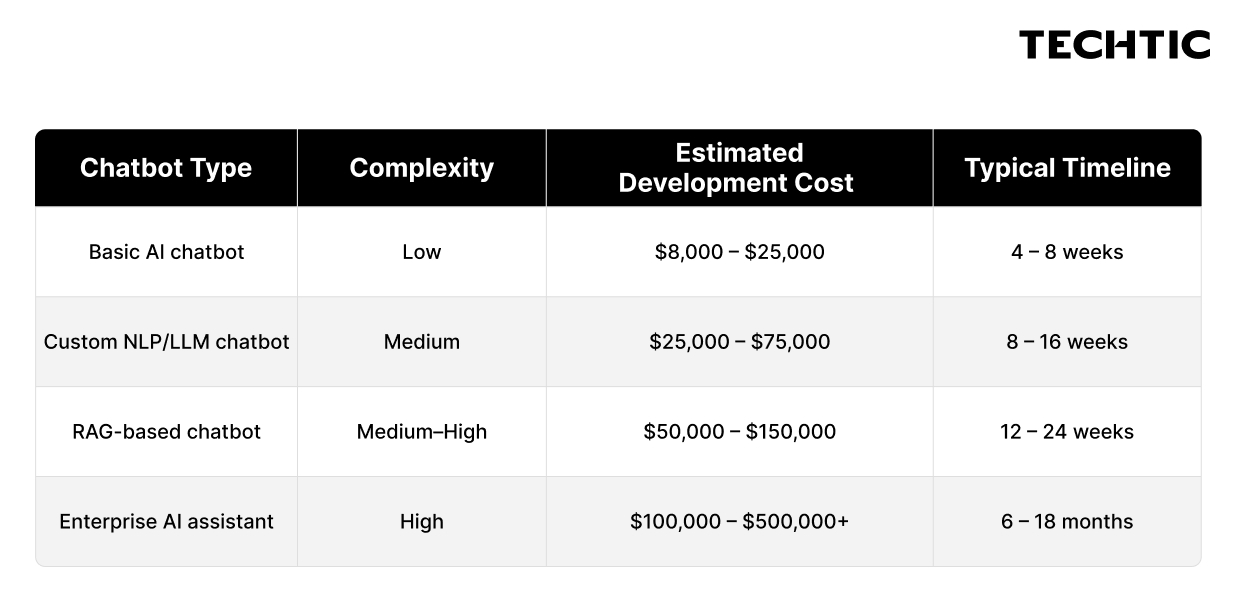
These ranges reflect development costs only, not licensing fees for third-party AI APIs, cloud infrastructure, or ongoing maintenance.
Important caveats:
- Development teams in North America and Western Europe typically charge more than teams in Eastern Europe, India, or Southeast Asia, sometimes by a factor of 3–5×.
- SaaS chatbot platforms (Intercom, Drift, Tidio with AI features) cost $50–$500/month but offer limited customization.
- API costs for models like GPT-4 or Claude are usage-based and become significant at high conversation volumes.
- These figures are estimates. Get detailed scoping before committing to a budget.
What Factors Affect AI Chatbot Development Cost?
AI Model and API Costs
Using GPT-4, Claude, or Gemini via API means paying per token, a cost that scales with usage volume. Higher-capability models cost more per query. At enterprise scale, this becomes a meaningful operational expense. Open-source models (Llama, Mistral) can reduce API costs but require more infrastructure and fine-tuning investment.
Data and Knowledge Base Preparation
If your source data is scattered across PDFs, legacy systems, inconsistently formatted documents, and outdated wikis, preparing it for a RAG pipeline takes significant time. Clean, structured, well-maintained data reduces this cost substantially.
RAG Architecture Complexity
A RAG pipeline involves vector databases, embedding models, retrieval logic, and ranking systems. The more sophisticated your retrieval requirements, the higher the development and infrastructure cost.
Number and Complexity of Integrations
Every CRM, ERP, helpdesk, or custom backend integration adds development time and testing effort. An enterprise chatbot connecting to Salesforce, ServiceNow, and a proprietary database costs significantly more than one with a single FAQ knowledge base.
Custom UI and UX Development
If the chatbot requires a custom-built interface rather than embedding a pre-built widget, front-end development adds time and cost.
Voice Capability
Adding speech-to-text and text-to-speech functionality requires additional components, and latency optimization for real-time voice adds engineering complexity.
Security and Compliance Requirements
Regulated industries (healthcare, finance, legal) require additional compliance work, HIPAA-aligned data handling, PCI-DSS controls, audit logging, encrypted storage. This adds development time and ongoing compliance overhead.
Infrastructure and Scalability
A chatbot handling 100 conversations per day has different infrastructure requirements than one handling 100,000. Designing for scale from the start is cheaper than retrofitting it later.
Team Location and Model
Offshore development teams typically charge $30–$80/hour. Onshore North American or Western European teams typically charge $100–$200+/hour. The gap in timeline estimates above reflects this range.
Maintenance and Iteration
Initial development cost is only part of the total investment. Budget for ongoing model updates, knowledge base maintenance, integration updates, and performance optimization.
Build vs. Buy vs. Customize an AI Chatbot
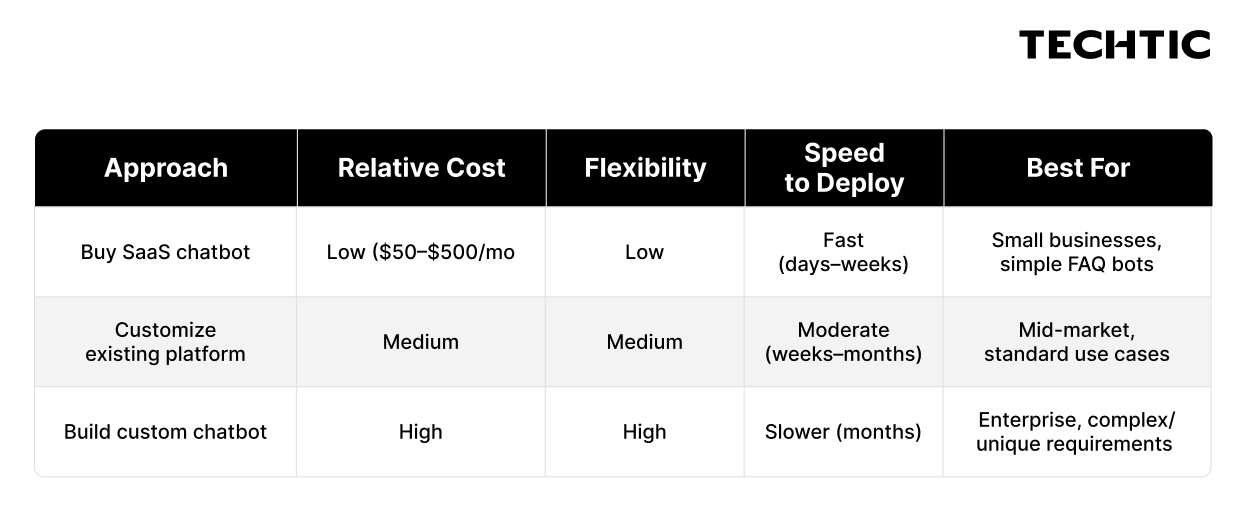
Buy (SaaS platform): Tools like Intercom, Drift, Tidio, or Freshdesk’s AI features offer pre-built AI chatbot capabilities on subscription plans. Fast to deploy, low upfront cost, but limited in customization, integration depth, data control, and scalability for complex enterprise needs.
Customize an existing platform: Platforms like Microsoft Copilot Studio, AWS Lex, or Google Dialogflow offer configurable AI chatbot frameworks. More flexible than pure SaaS, faster to build than fully custom, but still constrained by the platform’s architecture and pricing model.
Build custom: A fully custom-built AI chatbot using your chosen LLM, custom RAG pipeline, and proprietary integrations offers the highest flexibility and control. Higher upfront investment, but appropriate when your use case has unique data requirements, strict compliance needs, or differentiation requirements that off-the-shelf solutions can’t meet.
How to Choose the Right AI Chatbot Service
Before evaluating vendors or starting development, work through this framework:
Define the primary use case. Customer support deflection has different requirements than internal HR assistance or sales qualification. Clarity on the primary use case drives every architectural decision.
Assess your data situation. Do you have structured, accessible knowledge base content? Are your source systems API-accessible? The quality of your data determines the ceiling on your chatbot’s accuracy.
Understand your integration requirements. List every system the chatbot will need to read from or write to. Validate API availability for each.
Set realistic performance expectations. Define what “good” looks like, a 40% deflection rate? A 90% accuracy benchmark? Under 2-second response time? Without benchmarks, you can’t evaluate vendors fairly.
Evaluate compliance requirements. Know your regulatory environment before writing an RFP. A vendor that can’t meet your compliance needs wastes everyone’s time.
Consider total cost of ownership. Compare initial development cost, API usage cost at expected volume, infrastructure cost, and maintenance cost over a 3-year horizon. The cheapest build can be the most expensive solution.
Check vendor expertise – not just portfolio. Ask about their RAG implementation experience, their approach to hallucination control, and how they handle knowledge base updates. These are the questions that reveal whether a team has actually built production AI chatbots or just demos.
Common AI Chatbot Development Mistakes
Building without a defined use case. “We want an AI chatbot” isn’t a use case. Without specific query types, success metrics, and user personas, the development team has no target to hit.
Choosing an LLM based only on brand recognition. GPT-4 is excellent, it’s also not always the right choice. Cost, latency, data privacy, on-premise requirements, and context window size all affect model selection.
Underestimating data preparation. The knowledge base is the chatbot’s brain. Organizations that spend 80% of their budget on the chatbot interface and 20% on data quality typically get a well-packaged chatbot that gives wrong answers.
Skipping RAG and relying on LLM knowledge alone. LLMs have training cutoffs and don’t know your company’s specific products, policies, and procedures. Deploying a general LLM without grounding it in your data is a hallucination factory.
No guardrails or output controls. An enterprise AI chatbot deployed without content boundaries, topic restrictions, and accuracy controls is a liability, especially in regulated industries.
Poor integration planning. Treating integrations as an afterthought instead of scoping them thoroughly at the start leads to expensive rework when the chatbot can’t actually pull data from the CRM it was supposed to connect to.
No human escalation path. Chatbots that trap users in loops without an option to reach a human agent destroy customer satisfaction. Human handoff isn’t a failure case, it’s a necessary feature.
Measuring the wrong things. Tracking chatbot conversation volume without measuring resolution rate, deflection rate, and customer satisfaction gives you activity metrics, not business impact metrics.
Underestimating maintenance. An AI chatbot is not a “set and forget” deployment. Knowledge bases go stale, LLM APIs update, integrations break, and conversation patterns shift. Budget for ongoing maintenance from day one.
Ignoring security. Storing conversation data without encryption, failing to handle PII appropriately, or deploying without authentication where required creates regulatory and reputational exposure.
How Much Does It Cost to Maintain an AI Chatbot?
Ongoing costs are frequently underestimated in initial business cases. Realistic ongoing expense categories include:
AI/API usage fees: Token-based pricing for LLM APIs scales with conversation volume. At high volume, this becomes the largest ongoing cost. Factor in your expected monthly query volume before selecting a model.
Cloud infrastructure: Hosting, vector database storage, compute for retrieval operations, and CDN costs vary with usage but are typically $500–$5,000+/month depending on scale.
Knowledge base updates: When your products change, policies update, or new documentation is created, the knowledge base needs to reflect those changes. Someone needs to own this process.
Model and API updates: LLM providers release new model versions regularly. Evaluating and migrating to improved models when appropriate requires engineering time.
Monitoring and analytics: Reviewing conversation logs, tracking accuracy metrics, and identifying degradation issues requires ongoing attention.
Bug fixes and performance optimization: Post-launch issues surface in production in ways that testing doesn’t fully capture. Engineering capacity for ongoing fixes is a real cost.
Security and compliance maintenance: Penetration testing, compliance audits, and security patching are recurring requirements for enterprise deployments.
As a rough benchmark, many organizations budget 15–25% of initial development cost annually for maintenance and operations.
Is an AI Chatbot Right for Your Business?
Use this decision framework before committing:
Your organization likely benefits from an AI chatbot if:
- You handle more than 500 customer or employee queries per month with significant repetition
- Your team spends meaningful time on questions that have consistent, documentable answers
- You have business data in accessible systems that a chatbot could retrieve
- 24/7 availability would create real business value (global customers, after-hours demand)
- You have measurable inefficiency in a specific workflow an AI chatbot could automate
- Your compliance and security requirements are manageable
An AI chatbot may not be the right investment if:
- Your query volume is low and highly variable
- Your use cases require nuanced human judgment that doesn’t reduce to retrievable information
- Your source data is unstructured, inaccessible, or unreliable
- You don’t have internal capacity to maintain the knowledge base after deployment
- Your budget doesn’t support the quality of development required for your compliance environment
The honest answer is that AI chatbots deliver strong ROI in specific conditions. They underperform when deployed as a general solution without a clear use case.
Conclusion
AI chatbots deliver real business value, but only when the fundamentals are right. A clear use case, clean data, proper integrations, and realistic expectations matter far more than which LLM sits under the hood.
Start narrow. Pick one high-volume, well-documented problem to solve first. Measure what actually matters, resolution rate, deflection rate, customer satisfaction, not just conversation volume. And budget for maintenance from day one, because a chatbot that isn’t actively maintained degrades quickly.
The businesses winning with AI chatbots aren’t necessarily the ones spending the most. They’re the ones that were honest about their requirements before they started building.
If you’re ready to evaluate what an AI chatbot could look like for your specific use case, speak with an experienced AI development team that will tell you honestly whether you need a custom build, a configured platform, or simply better-organized data before anything else gets built.
FAQs
Q. What are AI chatbot services?
AI chatbot services are software solutions that use NLP, LLMs, and RAG to understand user questions and generate contextual responses. They automate customer support, sales qualification, employee assistance, and business workflows across websites, apps, and messaging platforms.
Q. How much does it cost to develop an AI chatbot?
AI chatbot development costs range from $8,000–$25,000 for basic solutions to $100,000–$500,000+ for enterprise deployments. Key cost drivers include complexity, number of integrations, AI model choice, compliance requirements, and whether you build in-house or with an external development team.
Q. What is a RAG chatbot?
A RAG (Retrieval-Augmented Generation) chatbot combines a large language model with real-time retrieval from a connected knowledge base. Instead of relying on general LLM training, it searches company-specific documents at query time, grounding responses in accurate, up-to-date business information.
Q. What is the difference between a rule-based chatbot and an AI chatbot?
Rule-based chatbots follow fixed decision trees and break outside their programmed responses. AI chatbots understand natural language intent, maintain multi-turn conversation context, retrieve information from business data, and generate flexible responses, handling queries that would fail a rule-based system.
Q. How long does it take to build an AI chatbot?
Basic AI chatbots can deploy in 4–8 weeks. Custom LLM chatbots with integrations typically take 8–16 weeks. Enterprise AI assistants with multiple system integrations and compliance requirements often require 6–18 months from scoping to production deployment.
Q. Should a business build or buy an AI chatbot?
Businesses with standard use cases and limited budgets should consider SaaS chatbot platforms. Mid-market companies may benefit from customizing existing AI platforms. Enterprises with complex requirements, proprietary data assets, or strict compliance needs typically get better long-term value from custom AI chatbot development.